> For the complete documentation index, see [llms.txt](https://docs.hello-lisa.com/llms.txt). Markdown versions of documentation pages are available by appending `.md` to page URLs; this page is available as [Markdown](https://docs.hello-lisa.com/knowledge/general/users-and-permissions/create-user-account-default.md).
# Create User Account (default)
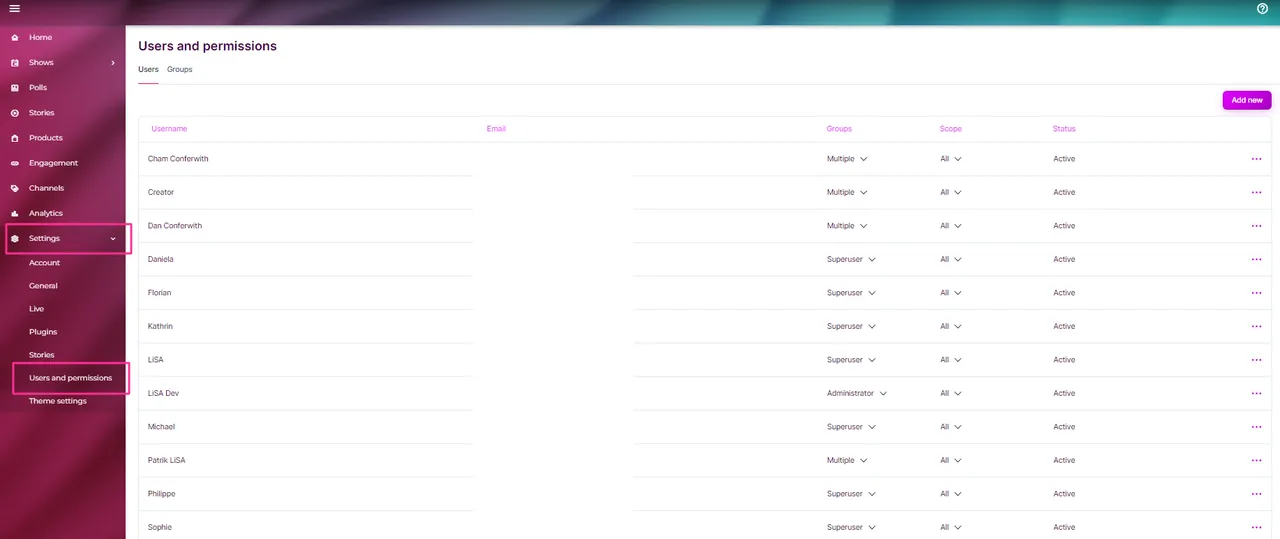
Admins have access to Users and Permissions inside the LiSA tool. Here you can create user accounts, custom groups, custom permissions.
Password resets, display name changes and more can be modified here as well.
## CREATE USER ACCOUNT (default user role & permissions)
### STEP 1: Locate Users and Permissions
Navigate to Settings on the left main menu and select Users and Permissions. You will see a list of all existing users.
### STEP 2: Create user
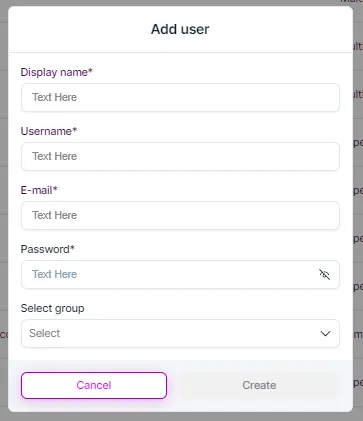
Click on the Add new icon in the top right corner and fill out the template
| | |
| ------------ | -------------------------------------------------------------------------------------------------- |
| Display name | This name can be displayed to viewers based on your show settings |
| Username | This will be used to log into the LiSA tool |
| E-Mail | This email is used e.g. for password resets |
| Password | Set up a password or use the default one. Upon the first login the user has to change the password |
| Select Group | Select the default group for this user. You can mix and match the roles. |
Once you have filled out all the information **click on Create**
{% hint style="warning" %}
All new user accounts will be created with Scope "All". Admins included.
{% endhint %}
{% hint style="info" %}
Any new user will receive a welcome mail with log in details.
Drag to move block Click to open menu Drag to move block Click to open menu
**The temporary password is valid for 7 days**. Upon first log in the user has to change it. If a user has not logged into the account within 7 days after account creation, this user account has to be delted and recreated
{% endhint %}